Volunteer scheduling, right in your Slack workspace
People give their time for a reason
Sign-up should never be the hard part
How it works
-
Set up your event
From a spreadsheet
Fill in the template and upload it as a CSV.
By hand
Or enter the jobs, shifts and spots yourself in the VolunTree tab.
-
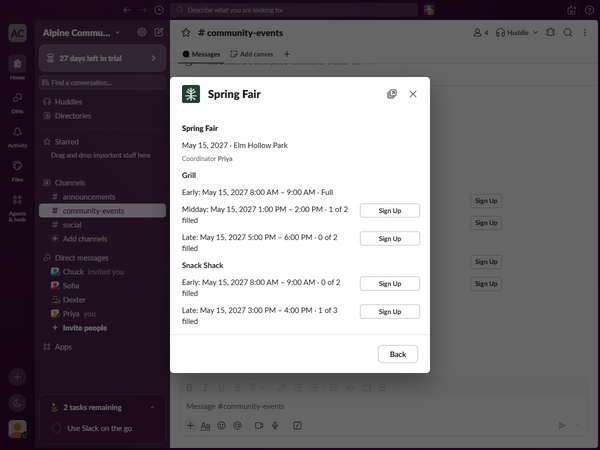
Volunteers sign up
Volunteers sign up from a button on the channel post and get a confirmation message in Slack.
-
See who is coming
The roster shows who is on each shift and which spots are still open.
Coordinators can post a nudge that lists only the shifts still open, and each open shift has its own sign-up button.
Looking after your volunteers
Reminders before the shift
Volunteers get reminder messages in Slack before their shift, at times each coordinator can change.
Add the shift to your calendar
Every message that tells a volunteer they hold a shift lets them add it to their own calendar: Apple Calendar, Google Calendar or Outlook.
A message when an event changes
When a coordinator changes a shift's time, the volunteers on it get a message in Slack saying the shift has moved, with the new times.
A coordinator can rename an event or change where it is, and the volunteers signed up get a message about the change.